01 · Brief
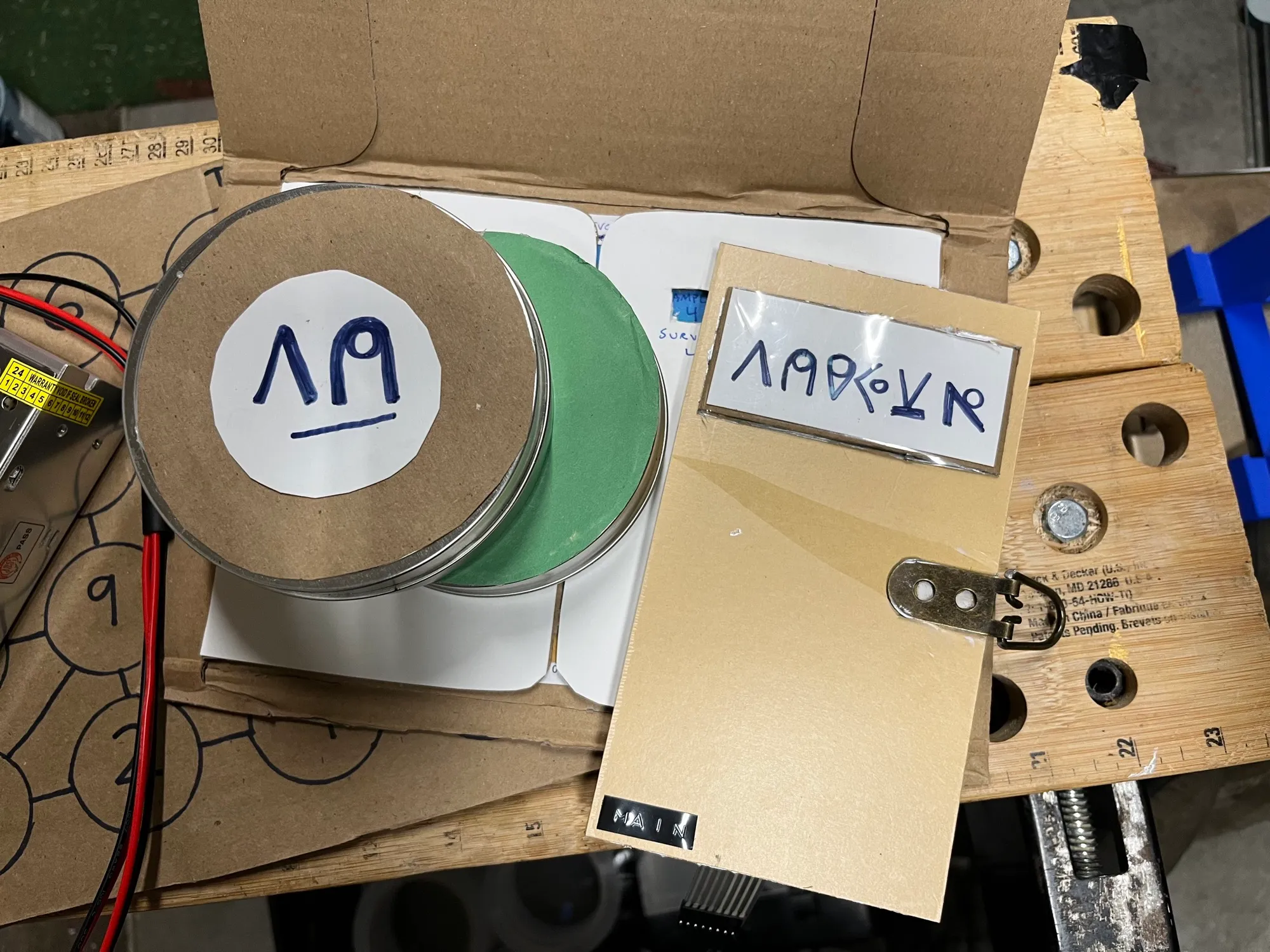
The first game gets players into the ship’s controls. A set of alien artifacts sits on the table, metal canisters with a symbol on the lid and a coloured base. The same symbols appear on a locked panel on the main enclosure. There is a locked case present which requires a simple 3 digit code to unlock. That first clue is a word puzzle presented to the players in the initial game material they receive (ships log entries).
Once they have unlocked the case they are presented with a sensor, small screen, and a survey map showing where samples were taken. Holding a sample canister over the colour sensor reads the base and turns the colour into a two-digit code on the OLED. Matching symbols to codes gives the combination for the panel keypad. Opening the panel hardware lock is accomplished by reading the terrain map through a special physical template.
Everything runs standalone on the Nano. No link to the Pi, just a sensor, a screen, and props that do the storytelling.
02 · System
03 · Source
Escape_Game_Final_ColorSensor.ino
void loop() {
  // Setting S2 Low, S3 Low applies RED filtered photodiodes
  digitalWrite(S2, LOW);
  digitalWrite(S3, LOW);
  // Read the output frequency
  currentReading[0] = pulseIn(sensorOut, digitalRead(sensorOut) == HIGH ? LOW : HIGH);

  // Setting S2 High, S3 High applies GREEN filtered photodiodes
  digitalWrite(S2, HIGH);
  digitalWrite(S3, HIGH);
  // Reading the output frequency
  currentReading[1] = pulseIn(sensorOut,  digitalRead(sensorOut) == HIGH ? LOW : HIGH);

  // Setting S2 LOW, S3 HIGH applied BLUE filtered photodiodes
  digitalWrite(S2, LOW);
  digitalWrite(S3, HIGH);
  // Reading the output frequency
  currentReading[2] = pulseIn(sensorOut,  digitalRead(sensorOut) == HIGH ? LOW : HIGH);

  #ifdef CALIBRATE
    char rawOutput[32];
    snprintf(rawOutput, 32, "Raw sensor values: %lu,%lu,%lu" , currentReading[0], currentReading[1], currentReading[2]);
    Serial.println(rawOutput);
  #endif

  // Loop over each of the three measurements taken this frame
  for (int i=0; i<3; i++) {
    // Use map() function to rescale values to the range of readings taken for white/black extremes
    int x = map(currentReading[i], blackReading[i], whiteReading[i], 0, 255);
    // Copy result back into the corresponding component of the RGB "colour" variable
    colour[i] = (byte)constrain(x, 0, 255);
  }

  // Send the RGB values to the serial monitor
  char output[32];
  snprintf(output, 32, "(%i,%i,%i)" , colour[0], colour[1], colour[2]);
  Serial.println(output);

  // The following code demonstrates how to perform some action if the colour detected
  // is similar enough to a specified target colour. First, specify the RGB values of the target
  int targetColourAR = 50, targetColourAG = 60, targetColourAB = 90; //(255,236,245) red (255,205,220)
  int targetColourBR = 115, targetColourBG = 120, targetColourBB = 90; //(232,238,251) blue (210,212,232)
  int targetColourCR = 90, targetColourCG = 90, targetColourCB = 100; //(248,255,238) green (232,240,213)
  // The threshold value determines how similar the colours have to be to match - higher values = less sensitive
  int threshold = 50;
  // Call the getColourDistance function to determine the distance between the colours, and compare to the threshold
  if(getColourDistance((int)colour[0], (int)colour[1], (int)colour[2], targetColourAR, targetColourAG, targetColourAB) < threshold) {
    Serial.println(F("The sensor has detected the target colour!"));
    displayValue = "17";

  } else if (getColourDistance((int)colour[0], (int)colour[1], (int)colour[2], targetColourBR, targetColourBG, targetColourBB) < threshold) {
    Serial.println(F("The sensor has detected the target colour!"));
    displayValue = "34";

  } else if (getColourDistance((int)colour[0], (int)colour[1], (int)colour[2], targetColourCR, targetColourCG, targetColourCB) < threshold) {
    Serial.println(F("The sensor has detected the target colour!"));
    displayValue = "86";
  } else {
    displayValue = ("...");
  }
  // Set the LEDs to match the colour detected
 showDisplay();

}04 · Lessons
The Color sensor was very difficult to calibrate as I used construction paper for the canister colors. Not having black and white construction paper meant my color matching had to have a wide margin of error. To manage this I used Red, Green, and Blue as the only three colors that the sensor had to read correctly.