01 · Brief
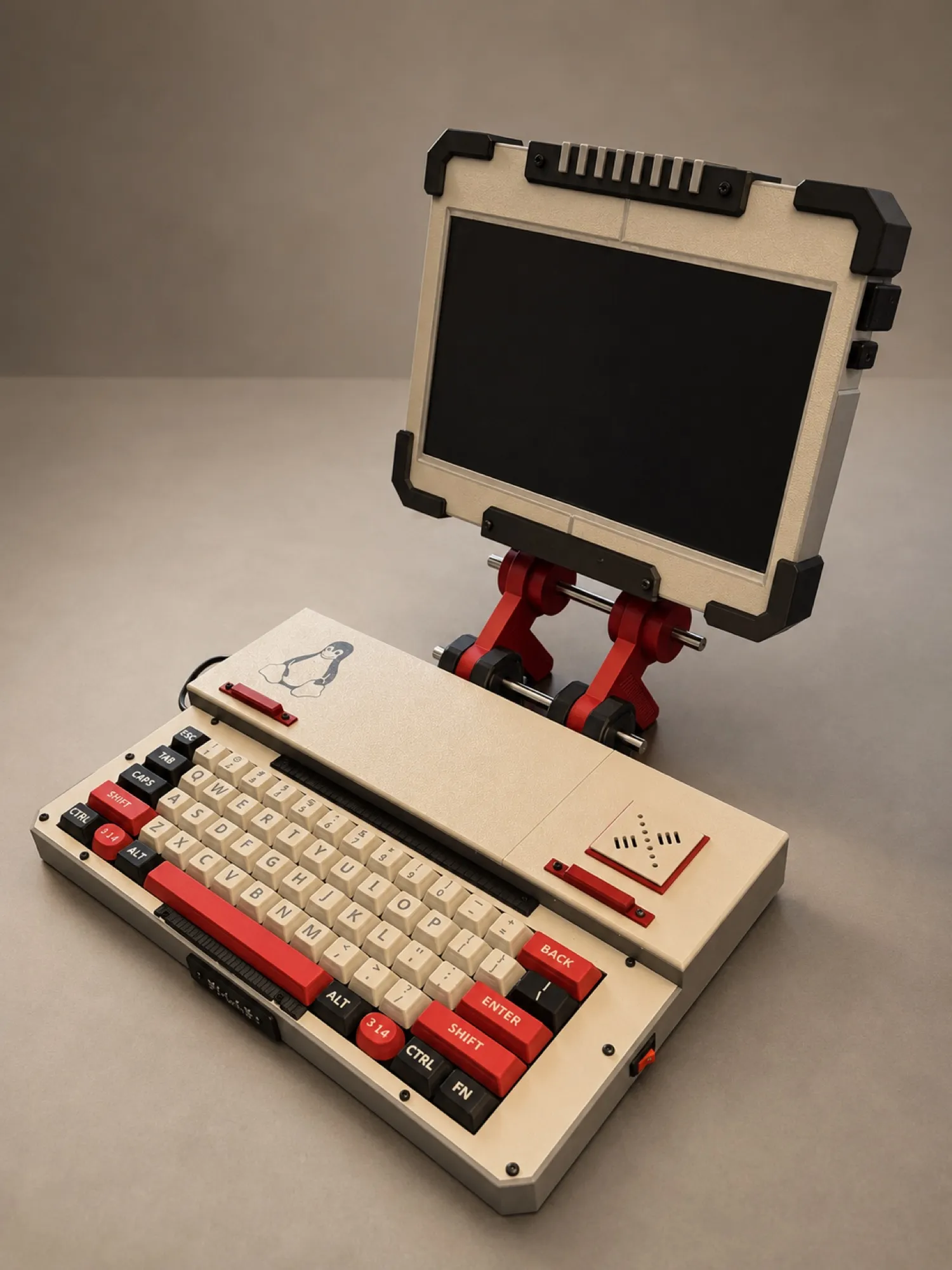
This is Pi-LAB. A months long pet project to design and build a Raspberry Pi based computer with a custom enclosure. I originally wanted to design the keyboard from scratch. After struggling with trace routing in KiCad’s PCB design program I decided starting from a bare PCB was okay for a first project. I wrote the keymap and flashed the PCB using QMK, and I used a keycap customization program out on makerworld to print the key caps. The white key switches give it a nice clicky feel and my custom 3.14 key (Replacing the windows/mac key) was a fun touch. It definitely turned out heavier than I wanted, but the UPS does allow me to cart it around the house without too much trouble. The hinges were the hardest. After experimenting with several ball and spring designs I had to just glue the things in place. That is where I will start from when version 2 begins.
02 · System
03 · Source
mk61_keymap.c
#include QMK_KEYBOARD_H

enum layers { _LAYER0, _LAYER1 };

// _LAYER0 is standard 60% ANSI. Holding MO(1)
// opens this layer: F-keys, underglow, bootloader.
const uint16_t PROGMEM
  keymaps[][MATRIX_ROWS][MATRIX_COLS] = {
  [_LAYER1] = LAYOUT_60_ansi(
    QK_GESC, KC_F1, KC_F2, KC_F3, KC_F4, KC_F5,
    KC_F6, KC_F7, KC_F8, KC_F9, KC_F10, KC_F11,
    KC_F12, KC_DEL,
    KC_TRNS, UG_TOGG, UG_NEXT, UG_HUEU, UG_HUED,
    UG_SATU, UG_SATD, UG_VALU, UG_VALD, KC_TRNS,
    KC_PSCR, KC_SCRL, KC_PAUSE, QK_BOOT,
    KC_TRNS, UG_SPDU, UG_SPDD, KC_TRNS, KC_TRNS,
    KC_TRNS, KC_TRNS, KC_TRNS, KC_TRNS, KC_TRNS,
    KC_TRNS, KC_TRNS, KC_TRNS,
    KC_TRNS, KC_TRNS, KC_COPY, KC_PSTE, KC_TRNS,
    KC_TRNS, NK_TOGG, KC_TRNS, KC_TRNS, KC_TRNS,
    KC_TRNS, KC_TRNS,
    KC_TRNS, KC_TRNS, KC_TRNS, KC_TRNS, KC_TRNS,
    KC_TRNS, KC_TRNS, KC_TRNS
  )
};04 · Lessons
Designing a hinge system capable of holding the screen was challenging; spring/ball/detente replaced by glue
Managing heat off the UPS required a redesign of the fan placement.